
Few things are as terrifying in Java production systems as an OutOfMemoryError (OOM).
When memory runs out, applications slow down, crash, or become completely unresponsive – making OOM troubleshooting a critical skill for Java developers.
1 – java.lang.OutOfMemoryError: Java heap space
The message indicates object could not be allocated in the Java heap.
The problem can be as simple as a configuration issue, where the specified heap size is insufficient for the application.
In other cases, the message might be an indication that the application is unintentionally holding references to objects which are already useless and should be garbage collected.
This is a memory leak.
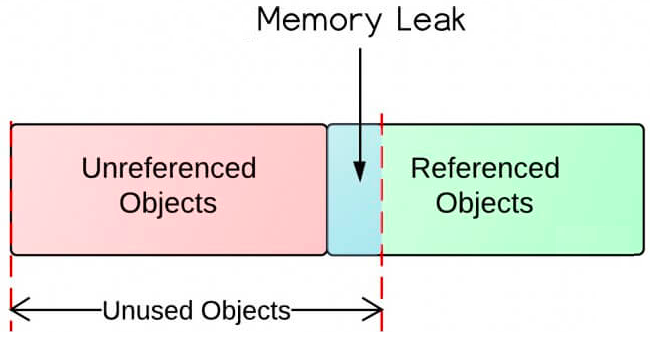
Memory leaks can occur for numerous reasons, below are the most common scenarios :
1.1 Static Field
Static fields have a life that usually matches the entire lifetime of the running application, so referencing a heavy object with a static field can lead to memory leak :
import java.util.ArrayList;
import java.util.List;

/**
 * -Xms10m -Xmx10m
 */
public class MemoryLeakTest {
    private static List<Object> list = new ArrayList<>();

    public static void main(String[] args) {
        for (int i = 0; i < 8; i++) {
            byte[] tenMB = new byte[1024 * 1024 * 10];

            list.add(tenMB);
        }

        System.out.println("Static list is filled, so far no OOM");

        // below creation of 20Mb object will cause OOM
        // since list holds useless objects which cause memory leak
        byte[] twentyMB = new byte[1024 * 1024 * 20];
        System.out.println(twentyMB);
    }
}

/*
Output:
    Static list is filled, so far no OOM
    Exception in thread "main" java.lang.OutOfMemoryError: Java heap space
        at MemoryLeakTest.main(MemoryLeakTest.java:21)
 */
How to prevent
Minimize the use of static variables even singletons.
1.2 equals() and hashCode() Implementations
If we use object of a class as key of map, equals and hashCode methods must be implemented, otherwise the key is object’s memory address, which can cause a memory leak :
import java.util.HashMap;
import java.util.Map;

public class MemoryLeakTest2 {
    public static void main(String[] args) {
        Map<Person, Integer> map = new HashMap<>();

        for (int i = 0; i < 3; i++) {
            map.put(new Person("tom", 18), 1);
        }

        // map should only contain one (k,v) = ((tom,18),1)
        // but it is not the case, there are 3 which cause a memory leak
        System.out.println(map.size());
    }

    private static class Person {
        private String name;
        private int age;

        public Person(String name, int age) {
            this.name = name;
            this.age = age;
        }
    }
}
/**
 * Output:
 *  3
 */
In case equals and hashCode are implemented, it has to pay attention that the fields are not modified on object once it is served as key of a map :
import java.util.HashMap;
import java.util.Map;

public class MemoryLeakTest3 {
    public static void main(String[] args) {
        Map<Person, Integer> map = new HashMap<>();

        Person p = new Person("tom", 18);

        map.put(p, 1);

        // comment below line will make map size = 1
        p.age = 16;

        map.put(p, 1);

        System.out.println(map.size());
    }

    private static class Person {
        private String name;
        private int age;

        public Person(String name, int age) {
            this.name = name;
            this.age = age;
        }

        @Override
        public int hashCode() {
            final int prime = 31;
            int result = 1;
            result = prime * result + age;
            result = prime * result + ((name == null) ? 0 : name.hashCode());
            return result;
        }

        @Override
        public boolean equals(Object obj) {
            if (this == obj)
                return true;
            if (obj == null)
                return false;
            if (getClass() != obj.getClass())
                return false;
            Person other = (Person) obj;
            if (age != other.age)
                return false;
            if (name == null) {
                if (other.name != null)
                    return false;
            } else if (!name.equals(other.name))
                return false;
            return true;
        }
    }
}
/**
 * Output:
 *  2
 */
How to prevent
when using an object of class as key of map or set, always override equals() and hashCode() methods, and do not modify the object itself once it is already served as a key.
1.3 Non Static Inner Class
Non-static Inner Class has an implicit reference to its Outer Class.
Even if Outer Class’ object goes out of scope, it will not be garbage collected, which can cause a memory leak :
public class MemoryLeakTest4 {
    public static void main(String[] args) throws InterruptedException {
        Outer outer = new Outer();
        Outer.Inner inner = outer.new Inner();
        inner.checkOuter();

        // make outer object unused
        outer = null;

        // do explicit gc
        System.gc();
        Thread.sleep(1000);
        System.out.println("A gc is done here.");

        inner.checkOuter();
    }
}

class Outer {
    class Inner {
        // print outer object
        void checkOuter() {
            if (Outer.this != null) {
                System.out.println(Outer.this);
            }
        }
    }
}
/*
 * Output :
 *      Outer@251a69d7
 *      A gc is done here.
 *      Outer@251a69d7
 */
How to prevent
Use static Inner Class if it does not need access to its Outer Class.
1.4 Implement finalize() Methods
If a class has a finalize method, then objects of that class aren’t instantly garbage collected.
Instead, the objects are queued for finalization, which occurs at a later time.
If the finalization queue increases at a rate that is faster than the rate at which the finalizer thread is servicing it, a memory leak could be caused leading to OOM :
import java.lang.ref.ReferenceQueue;
import java.lang.reflect.Field;

/**
 * -Xms100m -Xmx100m
 */
public class MemoryLeakTest5 {
    public static void main(String[] args) {
        startCheckingFinalizerQueue();

        while (true) {
            new Dummy();
        }
    }

    private static class Dummy {
        @Override
        protected void finalize() throws Throwable {
            // do something in finalize method
            int a = 0;
            int b = 1;
            int c = a + b;
        }
    }

    private static void startCheckingFinalizerQueue() {
        Thread t = new Thread(() -> {
            while (true) {
                check();
            }
        });
        t.setDaemon(true);
        t.start();
    }

    private static void check() {
        // print total element's count of finalizer queue every second
        try {
            Thread.sleep(1000);

            Field field = Class.forName("java.lang.ref.Finalizer").getDeclaredField("queue");
            field.setAccessible(true);
            ReferenceQueue<Object> queue = (ReferenceQueue) field.get(null);

            field = ReferenceQueue.class.getDeclaredField("queueLength");
            field.setAccessible(true);
            long queueLength = (long) field.get(queue);

            System.out.format("There are %d elements in finalizer queue.%n", queueLength);
        } catch (Exception e) {
            e.printStackTrace();
        }
    }
}
/**
 * Output :
            There are 86966 elements in finalizer queue.
            There are 0 elements in finalizer queue.
            There are 377 elements in finalizer queue.
            There are 401 elements in finalizer queue.
            There are 24 elements in finalizer queue.
            There are 1 elements in finalizer queue.
            There are 1 elements in finalizer queue.
            There are 22002 elements in finalizer queue.
            There are 875597 elements in finalizer queue.
            There are 1351394 elements in finalizer queue.
            There are 1436478 elements in finalizer queue.
            There are 1441903 elements in finalizer queue.
            There are 1479023 elements in finalizer queue.

            Exception: java.lang.OutOfMemoryError thrown from the UncaughtExceptionHandler in thread "Thread-0"

            Exception: java.lang.OutOfMemoryError thrown from the UncaughtExceptionHandler in thread "main"
 */
How to prevent
Always avoid overriding finalize() method of a class.
1.5 Unclosed Streams And Connections
Whenever we make a new connection or open a stream (database connections, input streams, session objects …), the JVM allocates memory for these resources.
Forgetting to close these resources can block the memory, which leads to a memory leak :
import java.io.File;
import java.io.FileInputStream;
import java.io.FileNotFoundException;

/**
 * -Xms10m -Xmx10m
 */
public class MemoryLeakTest6 {
    public static void main(String[] args) throws FileNotFoundException {
        String dir = new File("").getAbsolutePath();
        String name = dir + File.separator + "README.md";

        // keep opening stream without closing
        while (true) {
            FileInputStream fis = new FileInputStream(name);
        }
    }
}
/**
 * Output:
 *      Exception in thread "main" java.lang.OutOfMemoryError: Java heap space
 *          at java.base/java.io.FileInputStream.<init>(FileInputStream.java:219)
 *          at MemoryLeakTest6.main(MemoryLeakTest6.java:15)
 */
How to prevent
Always use finally block to close resources, when using Java 7+, make use of try-with-resources block.
1.6 Using ThreadLocals In Thread Pool
ThreadLocals are supposed to be garbage collected once the holding thread is no longer alive.
Within a thread pool, each thread lives as long as the life of jvm, so if we do not clean thread local, it may cause a memory leak :
import java.util.ArrayList;
import java.util.List;
import java.util.concurrent.BlockingQueue;
import java.util.concurrent.ExecutorService;
import java.util.concurrent.LinkedBlockingQueue;
import java.util.concurrent.ThreadFactory;
import java.util.concurrent.ThreadPoolExecutor;
import java.util.concurrent.TimeUnit;

/**
 * -Xms10m -Xmx10m
 */
public class MemoryLeakTest7 {
    public static ThreadLocal<List<byte[]>> tl = new ThreadLocal<>() {
        @Override
        protected List<byte[]> initialValue() {
            return new ArrayList<>();
        }
    };

    public static void main(String[] args) throws InterruptedException {
        int nThreads = 2;
        ExecutorService pool = new MyThreadPoolExecutor(nThreads, nThreads,
                0L, TimeUnit.MILLISECONDS,
                new LinkedBlockingQueue<Runnable>(),
                new ThreadFactory() {
                    private int tCount = 1;

                    @Override
                    public Thread newThread(Runnable r) {
                        Thread t = new Thread(r);
                        t.setName("T" + this.tCount++);
                        return t;
                    }
                });
        while (true) {
            pool.submit(new MyRunnable());
            Thread.sleep(10);
        }
    }

    private static class MyThreadPoolExecutor extends ThreadPoolExecutor {
        public MyThreadPoolExecutor(int corePoolSize, int maximumPoolSize, long keepAliveTime,
                TimeUnit unit, BlockingQueue<Runnable> workQueue, ThreadFactory threadFactory) {
            super(corePoolSize, maximumPoolSize, keepAliveTime, unit, workQueue, threadFactory);
        }

        @Override
        protected void afterExecute(Runnable r, Throwable t) {
            // uncomment below will clean up thread local every time
            // tl.remove();
        }
    }

    private static class MyRunnable implements Runnable {
        @Override
        public void run() {
            List<byte[]> list = tl.get();

            list.add(new byte[1024 * 512]);

            // size of list keep increasing
            System.out.println(Thread.currentThread().getName() + " : " + list.size());
        }
    }
}
/**
 * Output:
    T2 : 1
    T2 : 2
    T1 : 1
    T2 : 3
    T1 : 2
    T2 : 4
    T1 : 3

    Exception: java.lang.OutOfMemoryError thrown from the UncaughtExceptionHandler in thread "main"
 */
How to prevent
Use remove() method to clean up ThreadLocals when they’re no longer used.
2 – java.lang.OutOfMemoryError: GC Overhead limit exceeded
The message indicates that the garbage collector is running all the time and Java program is making very slow progress.
After a garbage collection, if the Java process is spending more time doing garbage collection and if it is recovering little of the heap and has been doing so far the last x consecutive garbage collections, then this OOM is thrown.
Because the amount of live data barely fits into the Java heap having little free space for new allocations.
Action: Increase the heap size.
It also can be turned off with the command line flag -XX:-UseGCOverheadLimit.
3 – java.lang.OutOfMemoryError: Metaspace
Java class metadata is allocated in native memory.
The amount of metaspace that can be used for class metadata is limited by the parameter MaxMetaSpaceSize.
When the amount of native memory needed for a class metadata exceeds MaxMetaSpaceSize, a java.lang.OutOfMemoryError exception with a detail MetaSpace is thrown.
Action: If MaxMetaSpaceSize has been set, increase its value.
Reducing the size of the Java heap will make more space available for MetaSpace.
This is a correct trade-off if there is an excess of free space in the Java heap.
4 – java.lang.OutOfMemoryError: Requested array size exceeds VM limit
This message indicates that the application attempted to allocate an array that is larger than the heap size.
For example, if an application attempts to allocate an array of 512 MB but the maximum heap size is 256 MB then OutOfMemoryError will be thrown with the reason Requested array size exceeds VM limit.
Action: Usually the problem is either heap size too small, or a bug that results in an application attempting to create a huge array.
5 – java.lang.OufOfMemoryError: Direct Buffer Memory
Direct Buffer Memory are allocated to native memory space outside of the JVM’s established heap.
If this memory space outside of heap is exhausted, this message will be throw.
import java.io.IOException;
import java.nio.ByteBuffer;

/**
 * -Xms10m -Xmx10m
 */
public class MemoryLeakTest8 {
    public static void main(String[] args) throws InterruptedException, IOException {
        ByteBuffer.allocateDirect(1024 * 1024 * 11);
    }
}
/**
   Output:
     Exception in thread "main" java.lang.OutOfMemoryError: Cannot reserve 11534336 bytes of direct buffer memory (allocated: 0, limit: 10485760)
        at java.base/java.nio.Bits.reserveMemory(Bits.java:178)
        at java.base/java.nio.DirectByteBuffer.<init>(DirectByteBuffer.java:111)
        at java.base/java.nio.ByteBuffer.allocateDirect(ByteBuffer.java:360)
        at MemoryLeakTest8.main(MemoryLeakTest8.java:9)
 */
The amount of Memory used by a Java process includes the following elements:
Java Heap Size + Metaspace + DirectByteBuffers.
There is a JVM parameter named -XX:MaxDirectMemorySize which allows to set the maximum amount of memory which can be reserved to Direct Buffer Usage.
If this parameter is not configured, jvm takes the same as –Xmx.
So if we don’t configure -XX:MaxDirectMemorySize but do configure -Xmx2g, the default MaxDirectMemorySize will also be 2 GB.
It is the reason why increasing max heap size can sometime solve the problem even if the memory space is totally outside of java heap.
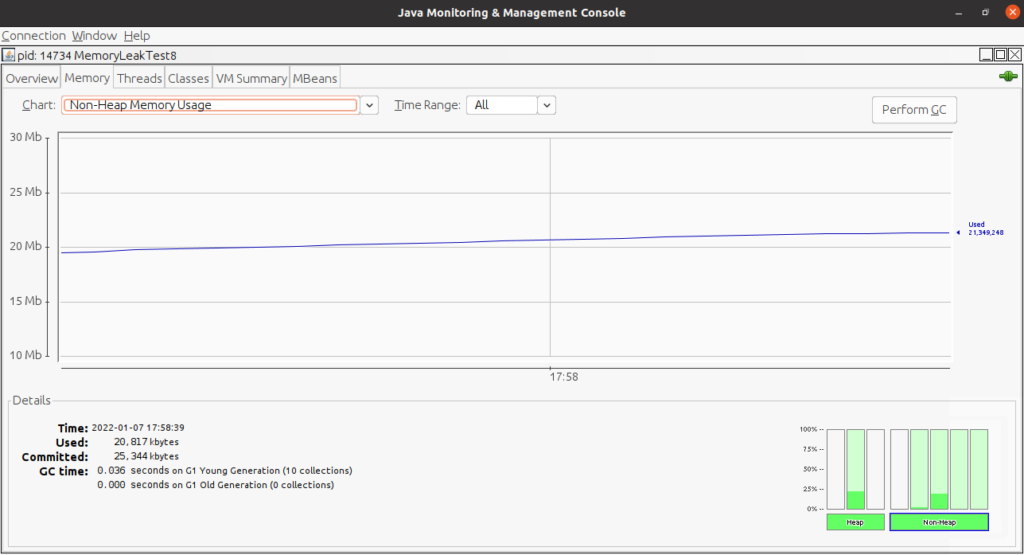
A good runtime indicator of a growing Direct Buffers allocation is the size of Non-Heap Java Memory usage, which can be collected with any tool, like jconsole :