

Since the first version released in 1996, the Java platform has been actively being developed for more than 30 years.
Many changes and improvements have been made to the technology over the years.
Major versions were released after every 2 years, however the Java 7 took 5 years to be available after its predecessor Java 6, and 3 years for Java 8 to be available to public afterward.
Since Java 10, new versions will be released every six months.
Versions 25, 21, 17, 11 and 8 are the currently long-term support (LTS) versions, where customers will receive Oracle Premier/Extended Support.
| LTS VERSION | RELEASE DATE | END OF SUPPORT |
|---|---|---|
| 8 | March 2014 | December 2030 |
| 11 | September 2018 | January 2032 |
| 17 | September 2021 | September 2029 |
| 21 | September 2023 | September 2031 |
| 25 | September 2025 | September 2033 |
Now that Java 8 has been widely used, it contains the following major new features compared to previous versions :
- Lambda Expressions, a new language feature, let us to treat functionality as a method argument, or code as data;
- Method references provide easy-to-read lambda expressions for methods that already have a name;
- Classes in the new java.util.stream package provide a Stream API to support functional-style operations on streams of elements;
- Default methods enable new functionality to be added to the interfaces of libraries and ensure binary compatibility with code written for older versions of those interfaces;
- Optional<T> class can help to handle situations where there is a possibility of getting the NPE;
- new APIs for Date and Time to address the shortcomings of the older java.util.Date and java.util.Calendar;
- Type Annotations provide the ability to use annotation anywhere we use a type;
- Repeating Annotations provide the ability to apply the same annotation type more than once to the same declaration or type use;
- Iterable interface;
- StringJoiner.
1. Lambda Expressions
A lambda expression is a short block of code which takes in parameters and returns a value.
It is similar to methods, but it does not need a name and it can be implemented right in the body of a method.
It is introduced in Java 8 to promote functional programming and it provides a way to pass a function as a method argument.
Before Java 8, it is possible to use Anonymous Inner Class in order to pass a block of code as a method argument.
public class Java8NewFeaturesTest1 {
    public static void main(String[] args) {
        int x = 1;
        int y = 2;

        compare(new MyComparator() {
            @Override
            public void compare(int a, int b) {
                if (a > b) {
                    System.out.println(a + " is bigger than " + b);
                } else if (a == b) {
                    System.out.println(a + " is equal to " + b);
                } else {
                    System.out.println(a + " is smaller than " + b);
                }
            }
        }, x, y);
    }

    private static void compare(MyComparator c, int x, int y) {
        c.compare(x, y);
    }

    private static interface MyComparator {
        void compare(int a, int b);
    }
}
/**
 * Output:
 *      1 is smaller than 2
 */
In Java 8, using lambda expression makes code more concise and readable.
public class Java8NewFeaturesTest2 {
    public static void main(String[] args) {
        int x = 1;
        int y = 2;

        compare((a, b) -> {
            if (a > b) {
                System.out.println(a + " is bigger than " + b);
            } else if (a == b) {
                System.out.println(a + " is equal to " + b);
            } else {
                System.out.println(a + " is smaller than " + b);
            }
        }, x, y);
    }

    private static void compare(MyComparator c, int x, int y) {
        c.compare(x, y);
    }

    @FunctionalInterface
    private static interface MyComparator {
        void compare(int a, int b);
    }
}
/**
 * Output:
 *      1 is smaller than 2
 */
Lambda expressions basically express implementations of functional interfaces.
Functional interfaces are also known as SAM (Single Abstract Method) interfaces since there is only one single abstract method.
Since Java 8, there are many interfaces that are converted into functional interfaces.
All these interfaces are annotated with @FunctionalInterface.
These interfaces are as follows :
- Runnable : This interface only contains the run() method;
- Comparable : This interface only contains the compareTo() method;
- ActionListener : This interface only contains the actionPerformed() method;
- Callable : This interface only contains the call() method.
Java 8 included also four main kinds of functional interfaces which can be applied in multiple situations :
Consumer : it accepts only one argument and returns nothing;
import java.util.ArrayList;
import java.util.List;
import java.util.function.Consumer;

public class Java8NewFeaturesTest3 {
    public static void main(String[] args) {
        Consumer<List<Integer>> modify = l -> {
            for (int i = 0; i < l.size(); i++) {
                l.set(i, 2 * l.get(i));
            }
        };

        Consumer<List<Integer>> display = l -> {
            for (int i = 0; i < l.size(); i++) {
                System.out.print(l.get(i) + " ");
            }
            System.out.println();
        };

        List<Integer> l = new ArrayList<Integer>();

        l.add(1);
        l.add(2);
        l.add(3);

        display.andThen(modify).andThen(display).accept(l);
    }
}
/**
 * Output:
 *          1 2 3
 *          2 4 6
 */
Predicate : it accepts a single value or argument and does some sort of processing, and returns a boolean (True/ False) answer;
import java.util.ArrayList;
import java.util.List;
import java.util.function.Predicate;

public class Java8NewFeaturesTest4 {
    public static void main(String[] args) {
        List<User> users = new ArrayList<>();

        users.add(new User("tom", 18, "cat"));
        users.add(new User("jerry", 16, "mouse"));
        users.add(new User("butch", 18, "cat"));
        users.add(new User("Toodles Galore", 16, "cat"));
        users.add(new User("spike", 21, "dog"));
        users.add(new User("tyke", 6, "dog"));
        users.add(new User("tuffy", 3, "mouse"));
        users.add(new User("topsy", 3, "dog"));

        Predicate<User> dog = (u -> u.role == "dog");
        Predicate<User> cat = (u -> u.role == "cat");
        Predicate<User> gt10 = (u -> u.age > 10);

        List<User> filtered = filter(users, gt10.and(cat.or(dog).negate()));

        display(filtered);
    }

    private static void display(List<User> filtered) {
        for (User user : filtered) {
            System.out.println(user);
        }
        System.out.println();
    }

    private static List<User> filter(List<User> users, Predicate<User> p) {
        List<User> filtered = new ArrayList<>();

        for (User user : users) {
            if (p.test(user)) {
                filtered.add(user);
            }
        }
        return filtered;
    }

    private static class User {
        private String name;
        private int age;
        private String role;

        public User(String name, int age, String role) {
            this.name = name;
            this.age = age;
            this.role = role;
        }

        @Override
        public String toString() {
            return "User [name=" + name + ", age=" + age + ", role=" + role + "]";
        }
    }
}
/**
 * Output :
 *      User [name=jerry, age=16, role=mouse]
 */
Supplier : it does not take any input or argument and yet returns a single output, it is generally used in the generation of values;
import java.util.ArrayList;
import java.util.Collections;
import java.util.List;
import java.util.function.Supplier;

public class Java8NewFeaturesTest5 {
    public static void main(String[] args) {
        draw("Euro Millions", () -> new Lottery(50, 7).shuffle());

        draw("Loto", () -> new Lottery(49, 6).shuffle());
    }

    private static void draw(String lottery, Supplier<List<Integer>> s) {
        List<Integer> result = s.get();

        System.out.println(lottery);
        for (int i = 0; i < result.size(); i++) {
            System.out.print(result.get(i) + " ");
        }
        System.out.println();
    }

    private static class Lottery {
        private int total;
        private int winning;
        private List<Integer> numbers;

        Lottery(int total, int winning) {
            this.total = total;
            this.winning = winning;
            this.numbers = new ArrayList<>(total);

            for (int i = 1; i <= this.total; i++) {
                this.numbers.add(i);
            }
        }

        List<Integer> shuffle() {
            Collections.shuffle(this.numbers);

            List<Integer> nums = new ArrayList<>();

            for (int i = 0; i < this.winning; i++) {
                nums.add(this.numbers.get(i));
            }

            return nums;
        }
    }
}
/**
 * Output :
 *      Euro Millions
 *      10 22 8 6 23 48 47
 *      Loto
 *      49 33 1 3 36 47
 */
Function : it receives only a single argument and returns a output value after the required processing, the argument and output can be a different type.
import java.util.ArrayList;
import java.util.List;
import java.util.function.Function;

public class Java8NewFeaturesTest6 {
    public static void main(String[] args) {
        List<Object[]> users = new ArrayList<>();

        users.add(new Object[] { "tom", 18 });
        users.add(new Object[] { "jerry", 16 });
        users.add(new Object[] { "spike", 21 });
        users.add(new Object[] { "tyke", 6 });

        Function<List<Object[]>, List<Person>> f1 = l -> {
            List<Person> p = new ArrayList<>();

            for (Object[] o : l) {
                p.add(new Person((String) o[0], (int) o[1]));
            }

            return p;
        };

        Function<List<Person>, List<Person>> f2 = l -> {
            l.sort((p1, p2) -> {
                return p1.age > p2.age ? 1 : p1.age == p2.age ? 0 : -1;
            });

            return l;
        };

        System.out.println();
        System.out.println("Original List :");

        for (Person person : f1.apply(users)) {
            System.out.println(person);
        }

        System.out.println();
        System.out.println("Sorted List by using andThen :");

        for (Person person : f1.andThen(f2).apply(users)) {
            System.out.println(person);
        }

        System.out.println();
        System.out.println("Sorted List by using compose :");

        for (Person person : f2.compose(f1).apply(users)) {
            System.out.println(person);
        }
    }

    private static class Person {
        private String name;
        private int age;

        public Person(String name, int age) {
            this.name = name;
            this.age = age;
        }

        @Override
        public String toString() {
            return "Person [name=" + name + ", age=" + age + "]";
        }
    }
}
/**
 * Output :
 *
 * Original List :
        Person [name=tom, age=18]
        Person [name=jerry, age=16]
        Person [name=spike, age=21]
        Person [name=tyke, age=6]

        Sorted List by using andThen :
        Person [name=tyke, age=6]
        Person [name=jerry, age=16]
        Person [name=tom, age=18]
        Person [name=spike, age=21]

        Sorted List by using compose :
        Person [name=tyke, age=6]
        Person [name=jerry, age=16]
        Person [name=tom, age=18]
        Person [name=spike, age=21]
 */
2. Method References
Method references are a special type of lambda expressions.
They’re often used to create simple lambda expressions by referencing existing methods.
There are 4 kinds of method references :
Static methods;
if a Lambda expression is like :
(args) -> Class.staticMethod(args)
then method reference is like :
Class::staticMethod
import java.util.Arrays;
import java.util.List;
import java.util.function.Consumer;

public class Java8NewFeaturesTest7 {
    public static void main(String[] args) {
        List<String> messages = Arrays.asList("hello", "world");

        /*
        Consumer<List<String>> c = l -> {
            Displayer.display(l);
        };
        */

        Consumer<List<String>> c = Displayer::display;

        c.accept(messages);
    }

    private static class Displayer {
        private static void display(List<String> l) {
            for (int i = 0; i < l.size(); i++) {
                System.out.println(l.get(i));
            }
        }
    }
}
/**
 * Output:
 *      hello
 *      world
 */
Instance methods of particular objects;
if a Lambda expression is like :
(args) -> obj.instanceMethod(args)
then method reference is like :
obj::instanceMethod
import java.util.Arrays;
import java.util.List;
import java.util.function.Consumer;

public class Java8NewFeaturesTest8 {
    public static void main(String[] args) {
        List<String> messages = Arrays.asList("hello", "world");

        Displayer d = new Displayer();

        /*
         * Consumer<List<String>> c = l -> {
         *      d.display(l);
         * };
         */

        Consumer<List<String>> c = d::display;

        c.accept(messages);
    }

    private static class Displayer {
        void display(List<String> l) {
            for (int i = 0; i < l.size(); i++) {
                System.out.println(l.get(i));
            }
        }
    }
}
/**
 * Output:
 *      hello
 *      world
 */
Instance methods of an arbitrary object of a particular type;
if a Lambda expression is like :
(obj, args) -> obj.instanceMethod(args)
then method reference is like :
ObjectType::instanceMethod
import java.util.Arrays;
import java.util.List;
import java.util.function.BiConsumer;

public class Java8NewFeaturesTest9 {
    public static void main(String[] args) {
        List<String> messages = Arrays.asList("hello", "world");

        Displayer d = new Displayer();

        /*
         * BiConsumer<Displayer, List<String>> c = (d, l) -> {
         *      d.display(l);
         * };
         */

        BiConsumer<Displayer, List<String>> c = Displayer::display;

        c.accept(d, messages);
    }

    private static class Displayer {
        void display(List<String> l) {
            for (int i = 0; i < l.size(); i++) {
                System.out.println(l.get(i));
            }
        }
    }
}
/**
 * Output:
 *      hello
 *      world
 */
Constructor.
if a Lambda expression is like :
(args) -> new ClassName(args)
then method reference is like :
ClassName::new
import java.util.List;
import java.util.function.Function;
import java.util.Arrays;

public class Java8NewFeaturesTest10 {
    public static void main(String[] args) {
        List<String> messages = Arrays.asList("hello", "world");

        // Function<List<String>, Displayer> f = l -> new Displayer(l);

        Function<List<String>, Displayer> f = Displayer::new;

        Displayer d = f.apply(messages);

        d.display();
    }

    private static class Displayer {
        private List<String> messages;

        Displayer(List<String> messages) {
            this.messages = messages;
        }

        void display() {
            for (int i = 0; i < this.messages.size(); i++) {
                System.out.println(this.messages.get(i));
            }
        }
    }
}
/**
 * Output:
 *      hello
 *      world
 */
3. Stream API
It is common in applications to have to manipulate a set of data.
To store this set of data, Java has offered, since version 1.1, the Collections API.
Various developments have made it possible to make the code for processing this data more and more expressive.
- Classic for loop :
import java.util.List;
import java.util.Arrays;

public class Java8NewFeaturesTest11 {
    public static void main(String[] args) {
        List<Integer> numbers = Arrays.asList(1, 2, 3, 4, 5, 6, 7, 8, 9, 10, 11, 12);
        int total = 0;
        for (int i = 0; i < numbers.size(); i++) {
            int current = numbers.get(i);
            if (current < 10) {
                total += current;
            }
        }
        System.out.println(total);
    }
}
/**
 * Output:
 * 45
 */
- Enhanced for loop :
import java.util.List;
import java.util.Arrays;

public class Java8NewFeaturesTest12 {
    public static void main(String[] args) {
        List<Integer> numbers = Arrays.asList(1, 2, 3, 4, 5, 6, 7, 8, 9, 10, 11, 12);
        int total = 0;
        for (int current : numbers) {
            if (current < 10) {
                total += current;
            }
        }
        System.out.println(total);
    }
}
/**
 *  Output:
 *      45
 */
- Iterator :
import java.util.List;
import java.util.Arrays;
import java.util.Iterator;

public class Java8NewFeaturesTest13 {
    public static void main(String[] args) {
        List<Integer> numbers = Arrays.asList(1, 2, 3, 4, 5, 6, 7, 8, 9, 10, 11, 12);
        int total = 0;
        Iterator<Integer> it = numbers.iterator();
        while (it.hasNext()) {
            int current = it.next();
            if (current < 10) {
                total += current;
            }
        }
        System.out.println(total);
    }
}
/**
 * Output:
 * 45
 */
- Foreach :
import java.util.List;
import java.util.concurrent.atomic.AtomicInteger;
import java.util.Arrays;

public class Java8NewFeaturesTest15 {
    public static void main(String[] args) {
        List<Integer> numbers = Arrays.asList(1, 2, 3, 4, 5, 6, 7, 8, 9, 10, 11, 12);
        AtomicInteger total = new AtomicInteger(0);
        numbers.forEach(n -> {
            if (n < 10) {
                total.getAndAdd(n);
            }
        });
        System.out.println(total.get());
    }
}
/**
 * Output:
 * 45
 */
Stream API is introduced since Java 8 in order to process collections of objects.
A stream is a sequence of objects that supports various methods which can be pipelined to produce the desired result.
import java.util.List;
import java.util.Arrays;

public class Java8NewFeaturesTest14 {
    public static void main(String[] args) {
        List<Integer> numbers = Arrays.asList(1, 2, 3, 4, 5, 6, 7, 8, 9, 10, 11, 12);
        int total = numbers.stream().filter(current -> current < 10).mapToInt(current -> current).sum();
        System.out.println(total);
    }
}
/**
 *  Output:
 *      45
 */
3.1 Stream Creation
The creation of a Stream is necessarily done from a data source.
There are different data sources : Collection, Array, File …
import java.io.File;
import java.io.IOException;
import java.nio.file.Files;
import java.nio.file.Path;
import java.nio.file.StandardOpenOption;
import java.util.Arrays;
import java.util.List;
import java.util.stream.Stream;

public class Java8NewFeaturesTest17 {
    public static void main(String[] args) throws IOException {
        String hello = "hello";
        String world = "world";

        // Collection
        List<String> l = Arrays.asList(hello, world);

        Stream<String> ls = l.stream();

        ls.forEach(System.out::println);

        System.out.println();

        // Array
        String[] s = { hello, world };

        Stream<String> as = Arrays.stream(s);

        as.forEach(System.out::println);

        System.out.println();

        // File
        File f = File.createTempFile(hello, world);

        f.deleteOnExit();

        Path p = f.toPath();
        Files.write(p, hello.getBytes(), StandardOpenOption.APPEND);
        Files.write(p, System.lineSeparator().getBytes(), StandardOpenOption.APPEND);
        Files.write(p, world.getBytes(), StandardOpenOption.APPEND);

        try (Stream<String> fs = Files.lines(p)) {
            fs.forEach(System.out::println);
        }
    }
}
/**
 * Output:
 *      hello
 *      world
 *
 *      hello
 *      world
 *
 *      hello
 *      world
 */
It is also possible to use Stream’s factories methods to produce elements as a data source.
import java.util.stream.Stream;

public class Java8NewFeaturesTest18 {
    public static void main(String[] args) {
        String hello = "hello";
        String world = "world";

        // Builder
        Stream<String> s1 = Stream.<String>builder().add(hello).add(world).build();

        s1.forEach(System.out::println);

        System.out.println();

        // Generate
        Stream<String> s2 = Stream.generate(() -> hello).limit(1);

        s2.forEach(System.out::println);

        System.out.println();

        // Iterate
        Stream<String> s3 = Stream.iterate(world, str -> str).limit(1);

        s3.forEach(System.out::println);

        System.out.println();

        // Of
        Stream<String> s4 = Stream.of(new String[] { hello, world });
        s4.forEach(System.out::println);
    }
}
/**
 * Output:
 *      hello
 *      world
 *
 *      hello
 *
 *      world
 *
 *      hello
 *      world
 */
3.2 Stream Pipeline
Data processing by a Stream is done in two stages :
- Configuration by invoking intermediate operations;
- Executing processing by invoking the terminate operation.
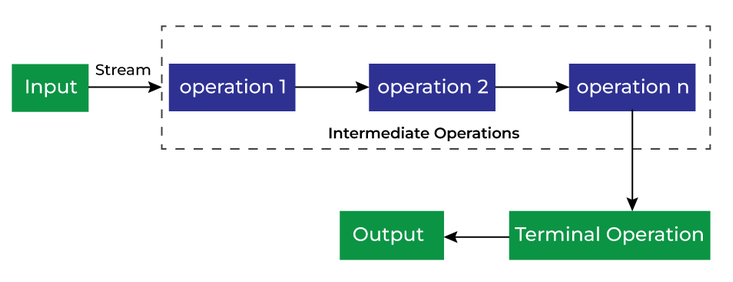
It has to note that no processing is performed when invoking intermediate operations.
As soon as a terminate operation is invoked, the Stream is considered consumed and no more of operations can be invoked.
import java.util.stream.Stream;

public class Java8NewFeaturesTest28 {
    public static void main(String[] args) {
        Integer[] arr = { 1, 3, 4, 2 };

        Stream<Integer> s = Stream.of(arr);

        s.forEach(System.out::println);

        System.out.println();

        s.forEach(System.out::println);
    }
}
/**
 * Output:
 *      1
 *      3
 *      4
 *      2
 *
 *      Exception in thread "main" java.lang.IllegalStateException: stream has already been operated upon or closed
 *          at java.base/java.util.stream.AbstractPipeline.evaluate(AbstractPipeline.java:229)
 *          at java.base/java.util.stream.ReferencePipeline.forEach(ReferencePipeline.java:647)
 *          at Java8NewFeaturesTest28.main(Java8NewFeaturesTest28.java:10)
 */
3.2.1 Intermediate Operations
Intermediate operations are the types of operations in which multiple methods are chained in a row.
Intermediate operations transform a stream into another stream.
Some common intermediate operations include :
- map(): transforms each element in a stream to another value;
import java.util.Arrays;
import java.util.List;
import java.util.stream.Stream;

public class Java8NewFeaturesTest19 {
    public static void main(String[] args) {
        List<String> names = Arrays.asList("tom", "jerry");

        names.forEach(System.out::println);

        System.out.println();

        Stream<Person> ps = names.stream().map(Person::new);

        ps.forEach(System.out::println);
    }

    private static class Person {
        private String name;

        public Person(String name) {
            this.name = name;
        }

        @Override
        public String toString() {
            return "Person [name=" + name + "]";
        }
    }
}
/**
 * Output:
        tom
        jerry

        Person [name=tom]
        Person [name=jerry]
 */
- flatMap(): flattens a stream of collections to a stream of objects;
import java.util.ArrayList;
import java.util.List;
import java.util.stream.Stream;

public class Java8NewFeaturesTest20 {
    public static void main(String[] args) {
        Person p1 = new Person("tom");
        Person p2 = new Person("jerry");

        List<Person> g1 = new ArrayList<>();

        g1.add(p1);
        g1.add(p2);

        Person p3 = new Person("spike");
        Person p4 = new Person("tyke");

        List<Person> g2 = new ArrayList<>();

        g2.add(p3);
        g2.add(p4);

        List<List<Person>> g = new ArrayList<>();

        g.add(g1);
        g.add(g2);

        // map
        Stream<List<Person>> ss = g.stream().map(group -> group);

        ss.forEach(System.out::println);

        System.out.println();

        // flatMap
        Stream<Person> s = g.stream().flatMap(group -> group.stream());

        s.forEach(System.out::println);
    }

    private static class Person {
        private String name;

        public Person(String name) {
            this.name = name;
        }

        @Override
        public String toString() {
            return "Person [name=" + name + "]";
        }
    }
}
/**
 * Output:
        [Person [name=tom], Person [name=jerry]]
        [Person [name=spike], Person [name=tyke]]

        Person [name=tom]
        Person [name=jerry]
        Person [name=spike]
        Person [name=tyke]
 */
- filter(): filters elements based on a specified condition;
import java.util.ArrayList;
import java.util.List;
import java.util.stream.Stream;

public class Java8NewFeaturesTest21 {
    public static void main(String[] args) {
        Person p1 = new Person("tom", 18);
        Person p2 = new Person("jerry", 16);
        Person p3 = new Person("spike", 26);
        Person p4 = new Person("tyke", 6);

        List<Person> ps = new ArrayList<>();

        ps.add(p1);
        ps.add(p2);
        ps.add(p3);
        ps.add(p4);

        Stream<Person> s = ps.stream().filter(p -> p.age > 10);

        s.forEach(System.out::println);
    }

    private static class Person {
        private String name;
        private int age;

        public Person(String name, int age) {
            this.name = name;
            this.age = age;
        }

        @Override
        public String toString() {
            return "Person [name=" + name + ", age=" + age + "]";
        }
    }
}
/**
 * Output:
        Person [name=tom, age=18]
        Person [name=jerry, age=16]
        Person [name=spike, age=26]
 */
- distinct(): returns a new stream consisting of the distinct elements from the given stream;
import java.util.ArrayList;
import java.util.List;
import java.util.stream.Stream;

public class Java8NewFeaturesTest22 {
    public static void main(String[] args) {
        Person p1 = new Person("tom", 18);
        Person p2 = new Person("jerry", 16);
        Person p3 = new Person("spike", 26);
        Person p4 = new Person("tyke", 6);
        Person p5 = new Person("tom", 18);
        Person p6 = new Person("jerry", 16);

        List<Person> ps = new ArrayList<>();

        ps.add(p1);
        ps.add(p2);
        ps.add(p3);
        ps.add(p4);
        ps.add(p5);
        ps.add(p6);

        Stream<Person> s = ps.stream().distinct();

        s.forEach(System.out::println);
    }

    private static class Person {
        private String name;
        private int age;

        public Person(String name, int age) {
            this.name = name;
            this.age = age;
        }

        @Override
        public String toString() {
            return "Person [name=" + name + ", age=" + age + "]";
        }

        @Override
        public int hashCode() {
            final int prime = 31;
            int result = 1;
            result = prime * result + ((name == null) ? 0 : name.hashCode());
            result = prime * result + age;
            return result;
        }

        @Override
        public boolean equals(Object obj) {
            if (this == obj)
                return true;
            if (obj == null)
                return false;
            if (getClass() != obj.getClass())
                return false;
            Person other = (Person) obj;
            if (name == null) {
                if (other.name != null)
                    return false;
            } else if (!name.equals(other.name))
                return false;
            if (age != other.age)
                return false;
            return true;
        }

    }
}
/**
 * Output:
        Person [name=tom, age=18]
        Person [name=jerry, age=16]
        Person [name=spike, age=26]
        Person [name=tyke, age=6]
 */
- limit(): retrieves a number of elements from the stream;
import java.util.ArrayList;
import java.util.List;
import java.util.stream.Stream;

public class Java8NewFeaturesTest23 {
    public static void main(String[] args) {
        Person p1 = new Person("tom", 18);
        Person p2 = new Person("jerry", 16);
        Person p3 = new Person("spike", 26);
        Person p4 = new Person("tyke", 6);

        List<Person> ps = new ArrayList<>();

        ps.add(p1);
        ps.add(p2);
        ps.add(p3);
        ps.add(p4);

        Stream<Person> s = ps.stream().limit(2);

        s.forEach(System.out::println);

        System.out.println();

        s = ps.stream().limit(6);

        s.forEach(System.out::println);

        System.out.println();

        s = ps.stream().limit(0);

        s.forEach(System.out::println);
    }

    private static class Person {
        private String name;
        private int age;

        public Person(String name, int age) {
            this.name = name;
            this.age = age;
        }

        @Override
        public String toString() {
            return "Person [name=" + name + ", age=" + age + "]";
        }
    }
}
/**
 * Output:
        Person [name=tom, age=18]
        Person [name=jerry, age=16]

        Person [name=tom, age=18]
        Person [name=jerry, age=16]
        Person [name=spike, age=26]
        Person [name=tyke, age=6]
 */
- skip(): skips the first x elements from the given stream;
import java.util.ArrayList;
import java.util.List;
import java.util.stream.Stream;

public class Java8NewFeaturesTest24 {
    public static void main(String[] args) {
        Person p1 = new Person("tom", 18);
        Person p2 = new Person("jerry", 16);
        Person p3 = new Person("spike", 26);
        Person p4 = new Person("tyke", 6);

        List<Person> ps = new ArrayList<>();

        ps.add(p1);
        ps.add(p2);
        ps.add(p3);
        ps.add(p4);

        Stream<Person> s = ps.stream().skip(2);

        s.forEach(System.out::println);
    }

    private static class Person {
        private String name;
        private int age;

        public Person(String name, int age) {
            this.name = name;
            this.age = age;
        }

        @Override
        public String toString() {
            return "Person [name=" + name + ", age=" + age + "]";
        }
    }
}
/**
 * Output:
        Person [name=spike, age=26]
        Person [name=tyke, age=6]
 */
- sorted(): sorts the elements of a stream;
import java.util.ArrayList;
import java.util.Comparator;
import java.util.List;
import java.util.stream.Stream;

public class Java8NewFeaturesTest25 {
    public static void main(String[] args) {
        Person p1 = new Person("tom", 18);
        Person p2 = new Person("jerry", 16);
        Person p3 = new Person("spike", 26);
        Person p4 = new Person("tyke", 6);

        List<Person> ps = new ArrayList<>();

        ps.add(p1);
        ps.add(p2);
        ps.add(p3);
        ps.add(p4);

        Stream<Person> s = ps.stream().sorted();

        s.forEach(System.out::println);

        System.out.println();

        s = ps.stream().sorted(Comparator.reverseOrder());

        s.forEach(System.out::println);

        System.out.println();

        s = ps.stream().sorted(new Comparator<Person>() {
            @Override
            public int compare(Person p1, Person p2) {
                return p1.age - p2.age;
            }
        });

        s = ps.stream().sorted((person1, person2) -> person1.age - person2.age);

        s.forEach(System.out::println);
    }

    private static class Person implements Comparable<Person> {
        private String name;
        private int age;

        public Person(String name, int age) {
            this.name = name;
            this.age = age;
        }

        @Override
        public String toString() {
            return "Person [name=" + name + ", age=" + age + "]";
        }

        @Override
        public int compareTo(Person p) {
            return this.name.compareTo(p.name);
        }
    }
}
/**
 * Output:
        Person [name=jerry, age=16]
        Person [name=spike, age=26]
        Person [name=tom, age=18]
        Person [name=tyke, age=6]

        Person [name=tyke, age=6]
        Person [name=tom, age=18]
        Person [name=spike, age=26]
        Person [name=jerry, age=16]

        Person [name=tyke, age=6]
        Person [name=jerry, age=16]
        Person [name=tom, age=18]
        Person [name=spike, age=26]
 */
- peek(): returns a new stream consisting of all the elements from the original stream after applying a given consumer action, the purpose of this operation is primarily debugging, for example, to display the element currently being processed;
import java.util.ArrayList;
import java.util.List;
import java.util.stream.Stream;

public class Java8NewFeaturesTest26 {
    public static void main(String[] args) {
        Person p1 = new Person("tom", 18);
        Person p2 = new Person("jerry", 16);
        Person p3 = new Person("spike", 26);
        Person p4 = new Person("tyke", 6);

        List<Person> ps = new ArrayList<>();

        ps.add(p1);
        ps.add(p2);
        ps.add(p3);
        ps.add(p4);

        Stream<Person> s = ps.stream()
                .filter(p -> p.age > 10)
                .peek(p -> {
                    System.out.println("peek : " + p);
                })
                .limit(2);

        s.forEach(System.out::println);
    }

    private static class Person {
        private String name;
        private int age;

        public Person(String name, int age) {
            this.name = name;
            this.age = age;
        }

        @Override
        public String toString() {
            return "Person [name=" + name + ", age=" + age + "]";
        }
    }
}
/**
 * Output:
        peek : Person [name=tom, age=18]
        Person [name=tom, age=18]
        peek : Person [name=jerry, age=16]
        Person [name=jerry, age=16]
 */
- sequential(): executes stream processes sequentially in a single thread;
import java.util.stream.Stream;

public class Java8NewFeaturesTest27 {
    public static void main(String[] args) {
        Integer[] arr = { 1, 3, 4, 2 };

        sort(Stream.of(arr)).forEach(System.out::println);

        System.out.println();

        sort(Stream.of(arr).sequential()).forEach(System.out::println);
    }

    private static Stream<Integer> sort(Stream<Integer> s) {
        return s.sorted()
                .peek(i -> {
                    System.out.println(Thread.currentThread().getName() + " : " + i);
                });
    }
}
/**
 * Output:
        main : 1
        1
        main : 2
        2
        main : 3
        3
        main : 4
        4

        main : 1
        1
        main : 2
        2
        main : 3
        3
        main : 4
        4
 */
- parallel(): executes stream processing in parallel using several threads from the Fork/Join pool;
import java.util.stream.Stream;

public class Java8NewFeaturesTest29 {
    public static void main(String[] args) {
        Integer[] arr = { 1, 3, 4, 2 };

        sort(Stream.of(arr)).forEach(System.out::println);

        System.out.println();

        sort(Stream.of(arr).parallel()).forEach(System.out::println);
    }

    private static Stream<Integer> sort(Stream<Integer> s) {
        return s.sorted()
                .peek(i -> {
                    System.out.println(Thread.currentThread().getName() + " : " + i);
                });
    }
}
/**
 * Output:
        main : 1
        1
        main : 2
        2
        main : 3
        3
        main : 4
        4

        main : 3
        3
        main : 1
        1
        ForkJoinPool.commonPool-worker-1 : 4
        4
        ForkJoinPool.commonPool-worker-2 : 2
        2
 */
It is the state indicated by the last sequential() or parallel() method which will be used to determine the execution mode of the stream processing.
import java.util.stream.Stream;

public class Java8NewFeaturesTest30 {
    public static void main(String[] args) {
        Integer[] arr = { 1, 3, 4, 2 };

        sort(Stream.of(arr)).forEach(System.out::println);

        System.out.println();

        sort(Stream.of(arr).parallel().sequential()).forEach(System.out::println);

        System.out.println();

        sort(Stream.of(arr).parallel()).sequential().forEach(System.out::println);
    }

    private static Stream<Integer> sort(Stream<Integer> s) {
        return s.sorted()
                .peek(i -> {
                    System.out.println(Thread.currentThread().getName() + " : " + i);
                });
    }
}
/**
 * Output:
        main : 1
        1
        main : 2
        2
        main : 3
        3
        main : 4
        4

        main : 1
        1
        main : 2
        2
        main : 3
        3
        main : 4
        4

        main : 1
        1
        main : 2
        2
        main : 3
        3
        main : 4
        4
 */
3.2.2 Terminal Operations
Terminal Operations are the type of Operations that return the result.
These Operations are not processed further just return a final result value.
Some common terminal operations include :
- forEach(): it is used to iterate through every element of the stream;
import java.util.stream.Stream;

public class Java8NewFeaturesTest31 {
    public static void main(String[] args) {
        Integer[] arr = { 1, 3, 4, 2 };

        Stream<Integer> s = Stream.of(arr);

        s.forEach(System.out::println);
    }
}
/**
 * Output:
        1
        3
        4
        2
 */
- forEachOrdered(): it is similar to the forEach() operation but it guarantees the order of the elements of the stream by using a single thread to execute the action on all elements;
import java.util.stream.Stream;

public class Java8NewFeaturesTest34 {
    public static void main(String[] args) {
        Integer[] arr = { 1, 3, 4, 2 };

        Stream.of(arr).parallel().forEach(System.out::println);

        System.out.println();

        Stream.of(arr).parallel().forEachOrdered(System.out::println);
    }
}
/**
 * Output:
        4
        2
        3
        1

        1
        3
        4
        2
 */
- collect(): it is used to return the result of the intermediate operations performed on the stream;
import java.util.Set;
import java.util.stream.Collectors;
import java.util.stream.Stream;

public class Java8NewFeaturesTest32 {
    public static void main(String[] args) {
        Integer[] arr = { 1, 3, 4, 2, 2, 3 };

        Stream<Integer> s = Stream.of(arr);

        Set<Integer> set = s.collect(Collectors.toSet());

        set.forEach(System.out::println);
    }
}
/**
 * Output :
 * 1
 * 2
 * 3
 * 4
 */
- findFirst(): it is used to find the first element in a stream;
- findAny(): it is used to find any element from a stream;
import java.util.Optional;
import java.util.stream.Stream;

public class Java8NewFeaturesTest37 {
    public static void main(String[] args) {
        Integer[] arr = { 1, 3, 4, 2 };

        Optional<Integer> first = Stream.of(arr).findFirst();

        System.out.println(first.get());

        Optional<Integer> any = Stream.of(arr).findAny();

        System.out.println(any.get());
    }
}
/**
 * Output :
 * 1
 * 1
 */
- anyMatch(): it returns whether any elements of this stream match the provided predicate;
- allMatch(): it returns whether all elements of this stream match the provided predicate;
- noneMatch(): it returns whether no elements of this stream match the provided predicate;
import java.util.stream.Stream;

public class Java8NewFeaturesTest38 {
    public static void main(String[] args) {
        Integer[] arr = { 1, 3, 4, 2 };

        System.out.println(Stream.of(arr).anyMatch(i -> i % 2 == 0));
        System.out.println(Stream.of(arr).allMatch(i -> i > 0));
        System.out.println(Stream.of(arr).noneMatch(i -> i < 0));
    }
}
/**
 * Output :
 * true
 * true
 * true
 */
- count(): it returns the count of elements in the stream;
import java.util.stream.Stream;

public class Java8NewFeaturesTest35 {
    public static void main(String[] args) {
        Integer[] arr = { 1, 3, 4, 2 };

        System.out.println(Stream.of(arr).count());
    }
}
/**
 * Output:
 * 4
 */
- reduce(): it takes a BinaryOperator as a parameter and is used to reduce the elements of a stream to a single value;
import java.util.Optional;
import java.util.stream.Stream;

public class Java8NewFeaturesTest33 {
    public static void main(String[] args) {
        Integer[] arr = { 1, 3, 4, 2 };

        Stream<Integer> s = Stream.of(arr);

        Optional<Integer> reduced = s.reduce((accumulated, current) -> accumulated += current);

        System.out.println(reduced.get());
    }
}
/**
 * Output:
 * 10
 */
- min(): it returns the minimum element of the stream based on the provided Comparator;
- max(): it returns the maximum element of the stream based on the provided Comparator;
import java.util.Comparator;
import java.util.Optional;
import java.util.stream.Stream;

public class Java8NewFeaturesTest36 {
    public static void main(String[] args) {
        Integer[] arr = { 1, 3, 4, 2 };

        Comparator<Integer> cmp = Comparator.comparingInt(i -> i);

        Optional<Integer> min = Stream.of(arr).min(cmp);

        System.out.println(min.get());

        Optional<Integer> max = Stream.of(arr).max(cmp);

        System.out.println(max.get());
    }
}
/**
 * Output:
 * 1
 * 4
 */
- toArray(): it returns an array containing the elements of this stream;
import java.util.stream.Stream;

public class Java8NewFeaturesTest39 {
    public static void main(String[] args) {
        Integer[] nums = { 1, 3, 4, 2 };

        Object[] arr = Stream.of(nums).toArray();

        for (int i = 0; i < arr.length; i++) {
            System.out.println(arr[i]);
        }

        System.out.println();

        Integer[] iarr = Stream.of(nums).toArray(size -> new Integer[size]);

        for (int i = 0; i < iarr.length; i++) {
            System.out.println(iarr[i]);
        }

        System.out.println();

        Integer[] iarray = Stream.of(nums).toArray(Integer[]::new);

        for (int i = 0; i < iarray.length; i++) {
            System.out.println(iarray[i]);
        }
    }
}
/**
 * Output:
        1
        3
        4
        2

        1
        3
        4
        2

        1
        3
        4
        2
 */
- iterator(): it returns an Iterator<T> which allows to go through all the elements of a Stream in an external iteration.
import java.util.Iterator;
import java.util.stream.Stream;

public class Java8NewFeaturesTest40 {
    public static void main(String[] args) {
        Integer[] nums = { 1, 3, 4, 2 };

        Iterator<Integer> it = Stream.of(nums).iterator();

        while (it.hasNext()) {
            Integer num = it.next();
            System.out.println(num);
        }

        System.out.println();

        for (int num : (Iterable<Integer>) Stream.of(nums)::iterator) {
            System.out.println(num);
        }
    }
}
/**
 * Output:
    1
    3
    4
    2

    1
    3
    4
    2
 */
3.3 Collectors
Stream.collect() is one of the Stream API’s terminal methods.
It allows to perform the repackaging data elements held in a Stream instance to some data structures and the applying some additional logic, concatenating them etc.
The strategy for this collect operation is provided via the Collector interface implementation.
3.3.1 Collectors class
All predefined implementations can be found in the Collectors class.
Collecting all Stream elements into collections :
Collect into list or set :
import java.util.List;
import java.util.Set;
import java.util.TreeSet;
import java.util.stream.Collectors;
import java.util.stream.Stream;

public class Java8NewFeaturesTest41 {
    public static void main(String[] args) {
        Integer[] nums = { 1, 3, 4, 2, 2, 4, 3, 1 };

        List<Integer> l = Stream.of(nums).collect(Collectors.toList());

        l.forEach(System.out::println);

        System.out.println();

        Set<Integer> s = Stream.of(nums).collect(Collectors.toSet());

        s.forEach(System.out::println);

        System.out.println();

        TreeSet<Integer> ts = Stream.of(nums).collect(Collectors.toCollection(TreeSet::new));

        ts.forEach(System.out::println);
    }
}
/**
 * Output:
        1
        3
        4
        2
        2
        4
        3
        1

        1
        2
        3
        4

        1
        2
        3
        4
 */
Collect into map :
import java.util.Map;
import java.util.function.Function;
import java.util.stream.Collectors;
import java.util.stream.Stream;

public class Java8NewFeaturesTest42 {
    public static void main(String[] args) {
        Integer[] nums = { 1, 3, 2, 4 };

        display(Stream.of(nums).collect(Collectors.toMap(k -> k, v -> v * 2)));

        System.out.println();

        display(Stream.of(nums).collect(Collectors.toMap(Function.identity(), v -> v * 2)));
    }

    private static void display(Map<Integer, Integer> m) {
        m.forEach((k, v) -> {
            System.out.println("key = " + k);
            System.out.println("value = " + v);
        });
    }
}
/**
 * Output:
        key = 1
        value = 2
        key = 2
        value = 4
        key = 3
        value = 6
        key = 4
        value = 8

        key = 1
        value = 2
        key = 2
        value = 4
        key = 3
        value = 6
        key = 4
        value = 8
 */
Pay attention that Collectors.toMap() does not provide support for duplicate keys.
If there are duplicate keys, we can add a third parameter mergeFunction into toMap() in order to indicate how we want to merge the values of duplicate keys.
import java.util.Map;
import java.util.stream.Collectors;
import java.util.stream.Stream;

public class Java8NewFeaturesTest43 {
    public static void main(String[] args) {
        Integer[] nums = { 1, 3, 2, 4, 2 };

        display(Stream.of(nums).collect(Collectors.toMap(k -> k, v -> v * 2, (v1, v2) -> {
            System.out.println("v1 = " + v1);
            System.out.println("v2 = " + v2);
            System.out.println();
            return v1;
        })));

        System.out.println();

        display(Stream.of(nums).collect(Collectors.toMap(k -> k, v -> v * 2)));
    }

    private static void display(Map<Integer, Integer> m) {
        m.forEach((k, v) -> {
            System.out.println("key = " + k);
            System.out.println("value = " + v);
        });
    }
}
/**
 * Output:
        v1 = 4
        v2 = 4

        key = 1
        value = 2
        key = 2
        value = 4
        key = 3
        value = 6
        key = 4
        value = 8

        Exception in thread "main" java.lang.IllegalStateException: Duplicate key 2 (attempted merging values 4 and 4)
                at java.base/java.util.stream.Collectors.duplicateKeyException(Collectors.java:135)
                at java.base/java.util.stream.Collectors.lambda$uniqKeysMapAccumulator$0(Collectors.java:182)
                at java.base/java.util.stream.ReduceOps$3ReducingSink.accept(ReduceOps.java:169)
                at java.base/java.util.Spliterators$ArraySpliterator.forEachRemaining(Spliterators.java:1024)
                at java.base/java.util.stream.AbstractPipeline.copyInto(AbstractPipeline.java:570)
                at java.base/java.util.stream.AbstractPipeline.wrapAndCopyInto(AbstractPipeline.java:560)
                at java.base/java.util.stream.ReduceOps$ReduceOp.evaluateSequential(ReduceOps.java:921)
                at java.base/java.util.stream.AbstractPipeline.evaluate(AbstractPipeline.java:265)
                at java.base/java.util.stream.ReferencePipeline.collect(ReferencePipeline.java:723)
                at Java8NewFeaturesTest43.main(Java8NewFeaturesTest43.java:18)
 */
Performing a complementary action after collecting :
The collectingAndThen() method executes an additional action in the form of a function after collecting.
import java.util.HashMap;
import java.util.Map;
import java.util.Set;
import java.util.stream.Collectors;
import java.util.stream.Stream;

public class Java8NewFeaturesTest44 {
    public static void main(String[] args) {
        Integer[] nums = { 1, 3, 2, 4 };

        display(Stream.of(nums).collect(
                Collectors.collectingAndThen(Collectors.toMap(i -> i, i -> i * 2), m -> {
                    if (m instanceof HashMap) {
                        Map<Integer, Integer> mm = (HashMap<Integer, Integer>) m;

                        Set<Integer> keys = mm.keySet();

                        for (Integer key : keys) {
                            mm.put(key, mm.get(key) / 2);
                        }
                    }
                    return m;
                })));
    }

    private static void display(Map<Integer, Integer> m) {
        m.forEach((k, v) -> {
            System.out.println("key = " + k);
            System.out.println("value = " + v);
        });
    }
}
/**
 * Output:
        key = 1
        value = 1
        key = 2
        value = 2
        key = 3
        value = 3
        key = 4
        value = 4
 */
Performing an aggregation after collecting :
The joining() method of the Collectors concatenates the elements of a Stream<String>.
import java.util.stream.Collectors;
import java.util.stream.Stream;

public class Java8NewFeaturesTest45 {
    public static void main(String[] args) {
        String word = Stream.of("he", "ll", "o").collect(Collectors.joining());

        System.out.println(word);

        String[] words = { "hello", "world" };

        String phrase = Stream.of(words).collect(Collectors.joining(" "));

        System.out.println(phrase);

        String greeting = Stream.of(words).collect(Collectors.joining(" ", "tom : ", "!"));

        System.out.println(greeting);
    }
}
/**
 * Output:
        hello
        hello world
        tom : hello world!
 */
Performing digital operations :
The counting() method counts the number of elements in the Stream.
import java.util.stream.Collectors;
import java.util.stream.Stream;

public class Java8NewFeaturesTest46 {
    public static void main(String[] args) {
        String[] words = { "hello", "world" };

        Long count = Stream.of(words).collect(Collectors.counting());

        System.out.println(count);
    }
}
/**
 * Output:
        2
 */
The summarizingInt(), summarizingLong() and summarizingDouble() methods calculate basic statistical information on the numerical data extracted from the elements of the Stream :
The number of elements, the min and max values, the average and the sum.
This data is respectively encapsulated in objects of type IntSummaryStatistics, LongSummaryStatistics, and DoubleSummaryStatistics.
import java.util.IntSummaryStatistics;
import java.util.stream.Collectors;
import java.util.stream.Stream;

public class Java8NewFeaturesTest47 {
    public static void main(String[] args) {
        Integer[] nums = { 1, 3, 2, 4 };

        IntSummaryStatistics iss = Stream.of(nums).collect(Collectors.summarizingInt(num -> num));

        System.out.println("average : " + iss.getAverage());
        System.out.println("count : " + iss.getCount());
        System.out.println("max : " + iss.getMax());
        System.out.println("min : " + iss.getMin());
        System.out.println("sum : " + iss.getSum());
    }
}
/**
 * Output:
        average : 2.5
        count : 4
        max : 4
        min : 1
        sum : 10
 */
The minBy() and maxBy() methods determines the smallest and largest element of the Stream, respectively.
import java.util.Optional;
import java.util.stream.Collectors;
import java.util.stream.Stream;

public class Java8NewFeaturesTest48 {
    public static void main(String[] args) {
        Integer[] nums = { 1, 3, 2, 4 };

        Optional<Integer> max = Stream.of(nums).collect(Collectors.maxBy((n1, n2) -> n1 - n2));

        System.out.println("max = " + max.get());

        Optional<Integer> max2 = Stream.of(nums).collect(Collectors.minBy((n1, n2) -> n2 - n1));

        System.out.println("max = " + max2.get());

        Optional<Integer> min = Stream.of(nums).collect(Collectors.minBy((n1, n2) -> n1 - n2));

        System.out.println("min = " + min.get());

        Optional<Integer> min2 = Stream.of(nums).collect(Collectors.maxBy((n1, n2) -> n2 - n1));

        System.out.println("min = " + min2.get());
    }
}
/**
 * Output:
        max = 4
        max = 4
        min = 1
        min = 1
 */
Performing groupings :
The groupingBy() method groups the elements of the Stream into a Map.
import java.util.List;
import java.util.Map;
import java.util.stream.Collectors;
import java.util.stream.Stream;

public class Java8NewFeaturesTest49 {
    public static void main(String[] args) {
        Integer[] nums = { 1, 3, 2, 4, 3, 4, 3, 4, 4 };

        Stream<Integer> s = Stream.of(nums);

        Map<Integer, List<Integer>> m = s.collect(Collectors.groupingBy(i -> i, Collectors.toList()));

        for (Map.Entry<Integer, List<Integer>> e : m.entrySet()) {
            System.out.println("key = " + e.getKey() + " value = " + e.getValue());
        }
    }
}
/**
 * Output:
    key = 1 value = [1]
    key = 2 value = [2]
    key = 3 value = [3, 3, 3]
    key = 4 value = [4, 4, 4, 4]
 */
The partitioningBy() method is a specialization of the groupingBy() method.
It expects a Predicate parameter to group the elements according to the Boolean value returned by the Predicate.
The returned Map type collection therefore necessarily has a Boolean as a key.
import java.util.List;
import java.util.Map;
import java.util.stream.Collectors;
import java.util.stream.Stream;

public class Java8NewFeaturesTest50 {
    public static void main(String[] args) {
        Integer[] nums = { 1, 3, 2, 4 };

        Stream<Integer> s = Stream.of(nums);

        Map<Boolean, List<Integer>> m = s.collect(Collectors.partitioningBy(i -> i % 2 == 0));

        for (Map.Entry<Boolean, List<Integer>> e : m.entrySet()) {
            System.out.println("key = " + e.getKey() + " value = " + e.getValue());
        }
    }
}
/**
 * Output:
    key = false value = [1, 3]
    key = true value = [2, 4]
 */
Performing transformations :
The mapping() method transforms type T objects into type U objects using the Function before applying the downstream Collector.
import java.util.List;
import java.util.stream.Collectors;
import java.util.stream.Stream;

public class Java8NewFeaturesTest52 {
    public static void main(String[] args) {
        Integer[] nums = { 1, 3, 2, 4 };

        Stream<Integer> s = Stream.of(nums);

        List<Integer> l = s
                .collect(Collectors.mapping(i -> i * 2, Collectors.toList()));

        for (int i : l) {
            System.out.println(i);
        }
    }
}
/* Output:
    2
    6
    4
    8
 */
The reducing() method performs a reduction operation applied repeatedly on all elements of the Stream to produce a result.
import java.util.stream.Collectors;
import java.util.stream.Stream;

public class Java8NewFeaturesTest53 {
    public static void main(String[] args) {
        Integer[] nums = { 1, 3, 2, 4 };

        int sum = Stream.of(nums)
                .collect(Collectors.reducing(0, (reduced, current) -> reduced + current));

        System.out.println(sum);

        int mappedSum = Stream.of(nums)
                .collect(Collectors.reducing(0, i -> 2 * i, (reduced, current) -> reduced + current));

        System.out.println(mappedSum);
    }
}
/**
 * Output:
    10
    20
 */
3.3.2 The combination of Collectors
It is possible to combine Collectors to achieve more complex reductions.
import java.util.Map;
import java.util.Set;
import java.util.stream.Collectors;
import java.util.stream.Stream;

public class Java8NewFeaturesTest51 {
    public static void main(String[] args) {
        Integer[] nums = { 1, 3, 2, 4, 4, 4, 4, 3, 3, 2 };

        Stream<Integer> s = Stream.of(nums);

        Map<Integer, Set<Integer>> m = s
                .collect(Collectors.groupingBy(i -> i, Collectors.mapping(i -> 2 * i, Collectors.toSet())));

        for (Map.Entry<Integer, Set<Integer>> e : m.entrySet()) {
            System.out.println("key = " + e.getKey() + " value = " + e.getValue());
        }
    }
}
/**
 * Output:
 * key = 1 value = [2]
 * key = 2 value = [4]
 * key = 3 value = [6]
 * key = 4 value = [8]
 */
As the groupingBy() method returns a Collector, it is possible to use a groupingBy() as a downstream Collector and thus achieve a two-level grouping.
import java.util.List;
import java.util.Map;
import java.util.stream.Collectors;
import java.util.stream.Stream;

public class Java8NewFeaturesTest54 {
    public static void main(String[] args) {
        Employee[] es = {
                new Employee("tom", 18, 10000),
                new Employee("jerry", 16, 10000),
                new Employee("spike", 28, 9000),
                new Employee("tyke", 6, 1000),
                new Employee("tuffy", 3, 100),
                new Employee("topsy", 3, 100),
        };

        Stream<Employee> s = Stream.of(es);

        Map<Integer, Map<Integer, List<Employee>>> m = s
                .collect(Collectors.groupingBy(e -> e.salary, Collectors.groupingBy(e -> e.age)));

        for (Map.Entry<Integer, Map<Integer, List<Employee>>> g : m.entrySet()) {
            System.out.println(g.getKey());
            System.out.println(g.getValue());
            System.out.println();
        }
    }

    private static class Employee {
        private String name;
        private int age;
        private int salary;

        public Employee(String name, int age, int salary) {
            this.name = name;
            this.age = age;
            this.salary = salary;
        }

        @Override
        public String toString() {
            return "Employee [name=" + name + ", age=" + age + ", salary=" + salary + "]";
        }
    }
}
/**
 * Output:
    10000
    {16=[Employee [name=jerry, age=16, salary=10000]], 18=[Employee [name=tom, age=18, salary=10000]]}

    100
    {3=[Employee [name=tuffy, age=3, salary=100], Employee [name=topsy, age=3, salary=100]]}

    1000
    {6=[Employee [name=tyke, age=6, salary=1000]]}

    9000
    {28=[Employee [name=spike, age=28, salary=9000]]}
 */
The combination of Collectors through downstream Collectors makes it possible to perform complex processing.
In the below example, they are used to determine the lowest age by salary range for a collection of employees.
import java.util.Map;
import java.util.Optional;
import java.util.stream.Collectors;
import java.util.stream.Stream;

public class Java8NewFeaturesTest55 {
    public static void main(String[] args) {
        Employee[] es = {
                new Employee("tom", 18, 10000),
                new Employee("jerry", 16, 10000),
                new Employee("spike", 28, 9000),
                new Employee("tyke", 6, 1000),
                new Employee("tuffy", 3, 100),
                new Employee("topsy", 3, 100),
        };

        Stream<Employee> s = Stream.of(es);

        Map<Integer, Optional<Integer>> m = s
                .collect(Collectors.groupingBy(e -> e.salary,
                        Collectors.mapping(e -> e.age, Collectors.maxBy((s1, s2) -> s2 - s1))));

        for (Map.Entry<Integer, Optional<Integer>> g : m.entrySet()) {
            System.out.println(g.getKey());
            System.out.println(g.getValue().get());
            System.out.println();
        }
    }

    private static class Employee {
        private String name;
        private int age;
        private int salary;

        public Employee(String name, int age, int salary) {
            this.name = name;
            this.age = age;
            this.salary = salary;
        }

        @Override
        public String toString() {
            return "Employee [name=" + name + ", age=" + age + ", salary=" + salary + "]";
        }
    }
}
/**
 * Output:
        10000
        16

        100
        3

        1000
        6

        9000
        28
 */
3.3.3 Implementing a Custom Collector
The JDK offers as standard a set of Collector implementations for common needs.
It is possible to create an implementation of the Collector interface to define custom reduction operations.
import java.util.StringJoiner;
import java.util.stream.Collector;
import java.util.stream.Stream;

public class Java8NewFeaturesTest56 {
    public static void main(String[] args) {
        Employee[] es = {
                new Employee("tom", 18, 10000),
                new Employee("jerry", 16, 10000),
                new Employee("spike", 28, 9000),
                new Employee("tyke", 6, 1000),
                new Employee("tuffy", 3, 100),
                new Employee("topsy", 3, 100),
        };

        Collector<Employee, StringJoiner, String> c = Collector.of(
                () -> {
                    System.out.println("supplier");
                    System.out.println();
                    return new StringJoiner(",");
                },
                (sj, e) -> {
                    System.out.println("accumulator");
                    System.out.println(sj.toString());
                    System.out.println(e);
                    System.out.println();
                    sj.add(e.name);
                },
                (sj1, sj2) -> {
                    System.out.println("combiner");
                    System.out.println(sj1.toString());
                    System.out.println(sj2.toString());
                    System.out.println();

                    return sj1.merge(sj2);
                },
                (sj) -> {
                    System.out.println("finisher");
                    System.out.println(sj);
                    System.out.println();

                    return sj.toString();
                });

        System.out.println(Stream.of(es).collect(c));
    }

    private static class Employee {
        private String name;
        private int age;
        private int salary;

        public Employee(String name, int age, int salary) {
            this.name = name;
            this.age = age;
            this.salary = salary;
        }

        @Override
        public String toString() {
            return "Employee [name=" + name + ", age=" + age + ", salary=" + salary + "]";
        }
    }
}
/**
 * Output :
        supplier

        accumulator

        Employee [name=tom, age=18, salary=10000]

        accumulator
        tom
        Employee [name=jerry, age=16, salary=10000]

        accumulator
        tom,jerry
        Employee [name=spike, age=28, salary=9000]

        accumulator
        tom,jerry,spike
        Employee [name=tyke, age=6, salary=1000]

        accumulator
        tom,jerry,spike,tyke
        Employee [name=tuffy, age=3, salary=100]

        accumulator
        tom,jerry,spike,tyke,tuffy
        Employee [name=topsy, age=3, salary=100]

        finisher
        tom,jerry,spike,tyke,tuffy,topsy

        tom,jerry,spike,tyke,tuffy,topsy
 */
3.4 Streams of primitive data
When a Stream is used on primitive data this can result in numerous boxing/unboxing operations to encapsulate a primitive value in a wrapper object and vice versa.
These operations can be costly when the number of elements to process in the Stream is large.
So when the data to be processed by the Stream is primitive data of type int, long or double, it is therefore preferable to use the IntStream, LongStream and DoubleStream interfaces.
import java.time.Duration;
import java.time.Instant;
import java.util.stream.LongStream;
import java.util.stream.Stream;

public class Java8NewFeaturesTest58 {
    public static void main(String[] args) {
        Instant t1 = Instant.now();
        System.out.println(sum());
        Instant t2 = Instant.now();
        System.out.println("Elapsed Time: " + Duration.between(t1, t2).toMillis() + " ms.");

        System.out.println();

        t1 = Instant.now();
        System.out.println(sum2());
        t2 = Instant.now();
        System.out.println("Elapsed Time: " + Duration.between(t1, t2).toMillis() + " ms.");
    }

    public static Long sum() {
        return Stream
                .iterate(0L, i -> i + 1L)
                .limit(100_000_000)
                .filter(i -> (i % 2) == 0)
                .map(i -> i + 1)
                .sorted()
                .reduce(0L, Long::sum);
    }

    public static long sum2() {
        return LongStream
                .iterate(0L, i -> i + 1L)
                .limit(100_000_000)
                .filter(i -> (i % 2) == 0)
                .map(i -> i + 1)
                .sorted()
                .reduce(0L, Long::sum);
    }
}
/**
 * Output:
        2500000000000000
        Elapsed Time: 19998 ms.

        2500000000000000
        Elapsed Time: 6020 ms.
 */
These interfaces work like the Stream interface with below new features :
- They offer some terminal operations specific to primitive types such as sum(), average();
import java.util.stream.IntStream;

public class Java8NewFeaturesTest57 {
    public static void main(String[] args) {
        System.out.println(IntStream.range(1, 5).sum());

        System.out.println();

        System.out.println(IntStream.range(1, 5).average().getAsDouble());
    }
}
/**
    Output:
        10

        2.5
 */
- It is possible to transform a primitive Stream into its wrapper object Stream or to transform a primitive Stream into any object Stream or to transform any object Stream into a primitive Stream.
import java.util.stream.IntStream;
import java.util.stream.Stream;

public class Java8NewFeaturesTest59 {
    public static void main(String[] args) {
        IntStream.range(1, 5).boxed().forEach(System.out::println);

        System.out.println();

        IntStream.range(1, 5).mapToObj(i -> "" + i).forEach(System.out::println);

        System.out.println();

        Stream.of("1", "2", "3", "4").mapToInt(Integer::parseInt).forEach(System.out::println);
    }
}
/**
    Output:
        1
        2
        3
        4

        1
        2
        3
        4

        1
        2
        3
        4
 */
3.5 Using Streams with I/O Operations
Certain methods of I/O classes return a Stream, notably from reading a text file or the content of elements in a directory.
3.5.1 Creating a Stream from a text file
import java.io.File;
import java.io.IOException;
import java.nio.file.Files;
import java.nio.file.Path;
import java.nio.file.Paths;
import java.util.stream.Stream;

public class Java8NewFeaturesTest60 {
    public static void main(String[] args) {
        String prefix = "hello";
        String suffix = "world";
        String content = "hi, helloworld!";

        Path path = generateTempFile(prefix, suffix, content);

        readFileByStream(path);
    }

    private static void readFileByStream(Path path) {
        if (path != null) {
            try (Stream<String> lines = Files.lines(path)) {
                lines.forEach(System.out::println);
            } catch (IOException e) {
                e.printStackTrace();
            }
        }
    }

    private static Path generateTempFile(String prefix, String suffix, String content) {
        try {
            File tempFile = File.createTempFile(prefix, suffix);
            tempFile.deleteOnExit();

            Path path = Paths.get(tempFile.getAbsolutePath());

            Files.write(path, content.getBytes());

            return path;
        } catch (IOException e) {
            e.printStackTrace();
        }

        return null;
    }
}
/**
 * Output:
 *      hi, helloworld!
 */
3.5.2 Creating a Stream from the contents of a directory
import java.io.File;
import java.io.IOException;
import java.nio.file.Files;
import java.nio.file.Path;
import java.nio.file.Paths;
import java.util.stream.Stream;

public class Java8NewFeaturesTest61 {
    public static void main(String[] args) {
        String prefix = "helloworld";
        String suffix = ".txt";
        String content = "hi, helloworld!";

        Path filePath = generateTempFile(prefix, suffix, content);

        if (filePath != null) {
            Path folderPath = filePath.getParent();

            try (Stream<Path> paths = Files.list(folderPath)) {
                paths.filter(p -> p.toString()
                        .endsWith(suffix))
                        .forEach(p -> {
                            System.out.println(p);

                            readFileByStream(p);
                        });
            } catch (IOException e) {
                e.printStackTrace();
            }
        }
    }

    private static void readFileByStream(Path path) {
        if (path != null) {
            try (Stream<String> lines = Files.lines(path)) {
                lines.forEach(System.out::println);
            } catch (IOException e) {
                e.printStackTrace();
            }
        }
    }

    private static Path generateTempFile(String prefix, String suffix, String content) {
        try {
            File tempFile = File.createTempFile(prefix, suffix);
            tempFile.deleteOnExit();

            Path path = Paths.get(tempFile.getAbsolutePath());

            Files.write(path, content.getBytes());

            return path;
        } catch (IOException e) {
            e.printStackTrace();
        }

        return null;
    }
}
/**
 * Output:
 *      /tmp/helloworld1234567890.txt
 *      hi, helloworld!
 */
3.6 Limitations of the Stream API
A Stream is not reusable.
import java.util.stream.Stream;

public class Java8NewFeaturesTest62 {
    public static void main(String[] args) {
        Stream<Integer> s = Stream.of(1, 2, 3, 4, 5);

        s.forEach(System.out::println);
        s.forEach(System.out::println);
    }
}
/**
 * Output:
        1
        2
        3
        4
        5
        Exception in thread "main" java.lang.IllegalStateException: stream has already been operated upon or closed
                at java.base/java.util.stream.AbstractPipeline.sourceStageSpliterator(AbstractPipeline.java:311)
                at java.base/java.util.stream.ReferencePipeline$Head.forEach(ReferencePipeline.java:803)
                at Java8NewFeaturesTest62.main(Java8NewFeaturesTest62.java:8)
 */
To get around this limitation, we must create a new Stream for each use.
import java.util.function.Supplier;
import java.util.stream.Stream;

public class Java8NewFeaturesTest63 {
    public static void main(String[] args) {
        Supplier<Stream<Integer>> s = () -> Stream.of(1, 2, 3, 4, 5);

        s.get().forEach(System.out::println);
        s.get().forEach(System.out::println);
    }
}
/**
 * Output:
        1
        2
        3
        4
        5
        1
        2
        3
        4
        5
 */
3.7 Some recommendations on using the Stream API
The Stream API allows certain processing to be carried out on a set of data in a declarative manner, which reduces the amount of code to produce.
But it should not systematically use the Stream API and rather encourage its use when it provides added value.
3.7.1 Misuse of the Stream API
Sometimes certain uses of the Stream API can make the code less readable and understandable or less efficient :
- Iterate elements by Stream :
If no intermediate operations are used in the Stream, then it is not useful to use a Stream to iterate the elements of a collection.
import java.util.Arrays;
import java.util.List;

public class Java8NewFeaturesTest64 {
    public static void main(String[] args) {
        List<Integer> nums = Arrays.asList(1, 2, 3, 4, 5);

        nums.stream().forEach(System.out::println);
    }
}
/**
 * Output:
 * 1
 * 2
 * 3
 * 4
 * 5
 */
It’s better to use the forEach() method on the collection without using a Stream.
import java.util.Arrays;
import java.util.List;

public class Java8NewFeaturesTest65 {
    public static void main(String[] args) {
        List<Integer> nums = Arrays.asList(1, 2, 3, 4, 5);

        nums.forEach(System.out::println);
    }
}
/**
 * Output:
 * 1
 * 2
 * 3
 * 4
 * 5
 */
- Replacing for loops with a Stream :
If the processing of the for loop is simple or stateful or it is not planned to parallelize them, then generally replacing them with a Stream sometimes makes the code less maintainable and/or less efficient.
import java.util.stream.IntStream;

public class Java8NewFeaturesTest66 {
    public static void main(String[] args) {
        int n = 2;

        for (int i = 0; i < n; i++) {
            for (int j = 0; j < n; j++) {
                System.out.println(i + "," + j);
            }
        }

        System.out.println();

        IntStream.range(0, n).forEach(i -> {
            IntStream.range(0, n).forEach(j -> {
                System.out.println(i + "," + j);
            });
        });
    }
}
/**
 * Output:

    0,0
    0,1
    1,0
    1,1

    0,0
    0,1
    1,0
    1,1
 */
Another reason is the clarity of stacktraces if an exception is thrown during iteration processing.
These are very clear in the case of a for loop and are more verbose in the case of a Stream.
import java.util.stream.IntStream;

public class Java8NewFeaturesTest67 {
    public static void main(String[] args) {
        int n = 2;

        try {
            for (int i = 0; i < n; i++) {
                System.out.println(i / 0);
            }
        } catch (Exception e) {
            e.printStackTrace();
        }
        try {
            System.out.println();

            IntStream.range(0, n).forEach(i -> {
                System.out.println(i / 0);
            });
        } catch (Exception e) {
            e.printStackTrace();
        }
    }
}
/**
 Output:
    java.lang.ArithmeticException: / by zero
        at Java8NewFeaturesTest67.main(Java8NewFeaturesTest67.java:9)

    java.lang.ArithmeticException: / by zero
        at Java8NewFeaturesTest67.lambda$0(Java8NewFeaturesTest67.java:18)
        at java.base/java.util.stream.Streams$RangeIntSpliterator.forEachRemaining(Streams.java:104)
        at java.base/java.util.stream.IntPipeline$Head.forEach(IntPipeline.java:619)
        at Java8NewFeaturesTest67.main(Java8NewFeaturesTest67.java:17)
 */
- Converting a collection :
There is no need to use a Stream to convert the elements of an array into a collection of type List.
It is better to use the asList() method of the Arrays class.
import java.util.Arrays;
import java.util.List;
import java.util.stream.Collectors;
import java.util.stream.Stream;

public class Java8NewFeaturesTest68 {
    public static void main(String[] args) {
        String[] names = { "tom", "jerry", "spike", "tyke" };

        List<String> nameList = Stream.of(names).collect(Collectors.toList());

        nameList.forEach(System.out::println);

        System.out.println();

        List<String> nameList2 = Arrays.asList(names);

        nameList2.forEach(System.out::println);
    }
}
/**
  Output :

    tom
    jerry
    spike
    tyke

    tom
    jerry
    spike
    tyke
 */
Likewise, there is no need to use a Stream to convert a collection to an array.
It is better to use the toArray() method of the Collection interface.
import java.util.ArrayList;
import java.util.List;

public class Java8NewFeaturesTest69 {
    public static void main(String[] args) {
        List<String> names = new ArrayList<>();

        names.add("tom");
        names.add("jerry");
        names.add("spike");
        names.add("tyke");

        String[] nameArray = names.stream().toArray(String[]::new);

        for (String name : nameArray) {
            System.out.println(name);
        }

        System.out.println();

        String[] nameArray2 = names.toArray(new String[0]);

        for (String name : nameArray2) {
            System.out.println(name);
        }
    }
}
/**
    Output :

        tom
        jerry
        spike
        tyke

        tom
        jerry
        spike
        tyke
 */
There is no need to use a Stream to convert a collection to another collection.
It is preferable to use the collection’s overload constructor which expects a collection as a parameter.
import java.util.ArrayList;
import java.util.HashSet;
import java.util.List;
import java.util.Set;
import java.util.stream.Collectors;

public class Java8NewFeaturesTest70 {
    public static void main(String[] args) {
        List<String> names = new ArrayList<>();

        names.add("tom");
        names.add("tom");
        names.add("jerry");
        names.add("jerry");
        names.add("spike");
        names.add("spike");
        names.add("tyke");
        names.add("tyke");

        Set<String> nameSet = names.stream().collect(Collectors.toSet());

        nameSet.forEach(System.out::println);

        System.out.println();

        Set<String> nameSet2 = new HashSet<>(names);

        nameSet2.forEach(System.out::println);
    }
}
/**
    Output :

        tom
        tyke
        jerry
        spike

        tom
        tyke
        jerry
        spike
 */
- The search for the biggest/smallest item in a collection :
There is no need to use a Stream to find only the biggest/smallest element in a collection.
It is better to use the max()/min() method of the Collections class.
import java.util.ArrayList;
import java.util.Collections;
import java.util.List;

public class Java8NewFeaturesTest71 {
    public static void main(String[] args) {
        List<Integer> nums = new ArrayList<>();

        nums.add(1);
        nums.add(2);
        nums.add(3);
        nums.add(4);

        int maximum = nums.stream().max((i1, i2) -> i1.compareTo(i2)).orElse(nums.get(0));

        System.out.println(maximum);

        System.out.println();

        maximum = Collections.max(nums);

        System.out.println(maximum);
    }
}
/**
 * Output:
 * 4
 *
 * 4
 */
- Determining the number of items in a collection :
There is no need to use a Stream to just determine the number of items in a collection.
It is better to use the size() method of the Collection interface.
import java.util.ArrayList;
import java.util.List;

public class Java8NewFeaturesTest72 {
    public static void main(String[] args) {
        List<Integer> nums = new ArrayList<>();

        nums.add(1);
        nums.add(2);
        nums.add(3);

        long count = nums.stream().count();

        System.out.println(count);

        System.out.println();

        System.out.println(nums.size());
    }
}
/**
 * Output:
 * 3
 *
 * 3
 */
- Checking the presence of an element in a collection :
It is not necessary to use a Stream to only check the presence of an element in a collection.
It is better to use the contains() method of the Collection interface.
import java.util.ArrayList;
import java.util.List;

public class Java8NewFeaturesTest73 {
    public static void main(String[] args) {
        int find = 2;

        List<Integer> nums = new ArrayList<>();

        nums.add(1);
        nums.add(find);
        nums.add(3);

        boolean exist = nums.stream().anyMatch(i -> i == find);

        System.out.println(exist);

        System.out.println();

        System.out.println(nums.contains(find));
    }
}
/**
 * Output:
 * true
 *
 * true
 */
3.7.2 Recommendations for Parallel Streams
All parallel processing executed by Streams uses the common thread pool of the Fork/Join framework by default.
It is therefore necessary not to carry out long blocking treatments in parallel.
When executing the processing of a Stream in parallel, the processing order of the elements is not guaranteed.
It is not recommended to use code that produces side effects when processing a Stream.
The below example produces a side effect by modifying a collection of type List.
This portion of code works correctly in sequential processing of the Stream.
On the other hand, if the processes are executed in parallel, the results will probably not be those expected because the ArrayList class is not thread-safe.
It is also possible in this case to use a synchronized version of the collection but this will add contention and therefore degrade performance.
import java.util.ArrayList;
import java.util.List;
import java.util.stream.IntStream;

public class Java8NewFeaturesTest74 {
    public static void main(String[] args) {
        int start = 0;
        int end = 10000;

        List<Integer> nums = new ArrayList<>();

        IntStream.range(start, end)
                .filter(i -> i % 2 == 0).forEach(i -> nums.add(i));

        System.out.println(nums.size());

        nums.clear();
        System.out.println();

        IntStream.range(start, end)
                .parallel()
                .filter(i -> i % 2 == 0).forEach(i -> nums.add(i));

        System.out.println(nums.size());
    }
}
/**
 * Output:
 * 5000
 *
 * 4545
 */
It is preferable to use a Collector to aggregate the values into a collection, which runs correctly sequentially and especially in parallel too.
import java.util.List;
import java.util.stream.Collectors;
import java.util.stream.IntStream;

public class Java8NewFeaturesTest75 {
    public static void main(String[] args) {
        int start = 0;
        int end = 10000;

        List<Integer> nums = IntStream.range(start, end)
                .parallel()
                .filter(i -> i % 2 == 0)
                .boxed()
                .collect(Collectors.toList());

        System.out.println(nums.size());
    }
}
/**
 * Output:
 * 5000
 */